Scope the work by phase
Separate demolition, rough-ins, finishes and other stages so inclusions, quantities and responsibilities are easier to review.
Sales & quotes
Build phased quotes with line items, material and labour costs, client prices, scope text and photos. Review the cost-to-revenue margin before sharing a branded PDF, then let the client choose optional items or phases before online approval. Professional and Business include AI Rewrite with Undo for supported quote line-item descriptions and internal notes.
Why it matters
Separate demolition, rough-ins, finishes and other stages so inclusions, quantities and responsibilities are easier to review.
Compare material and labour costs with client pricing, discounts, tax, deposits and the resulting gross margin inside the quote builder.
Present optional phases or upgrades in the shared quote so selected choices become part of the approved total and recorded scope.
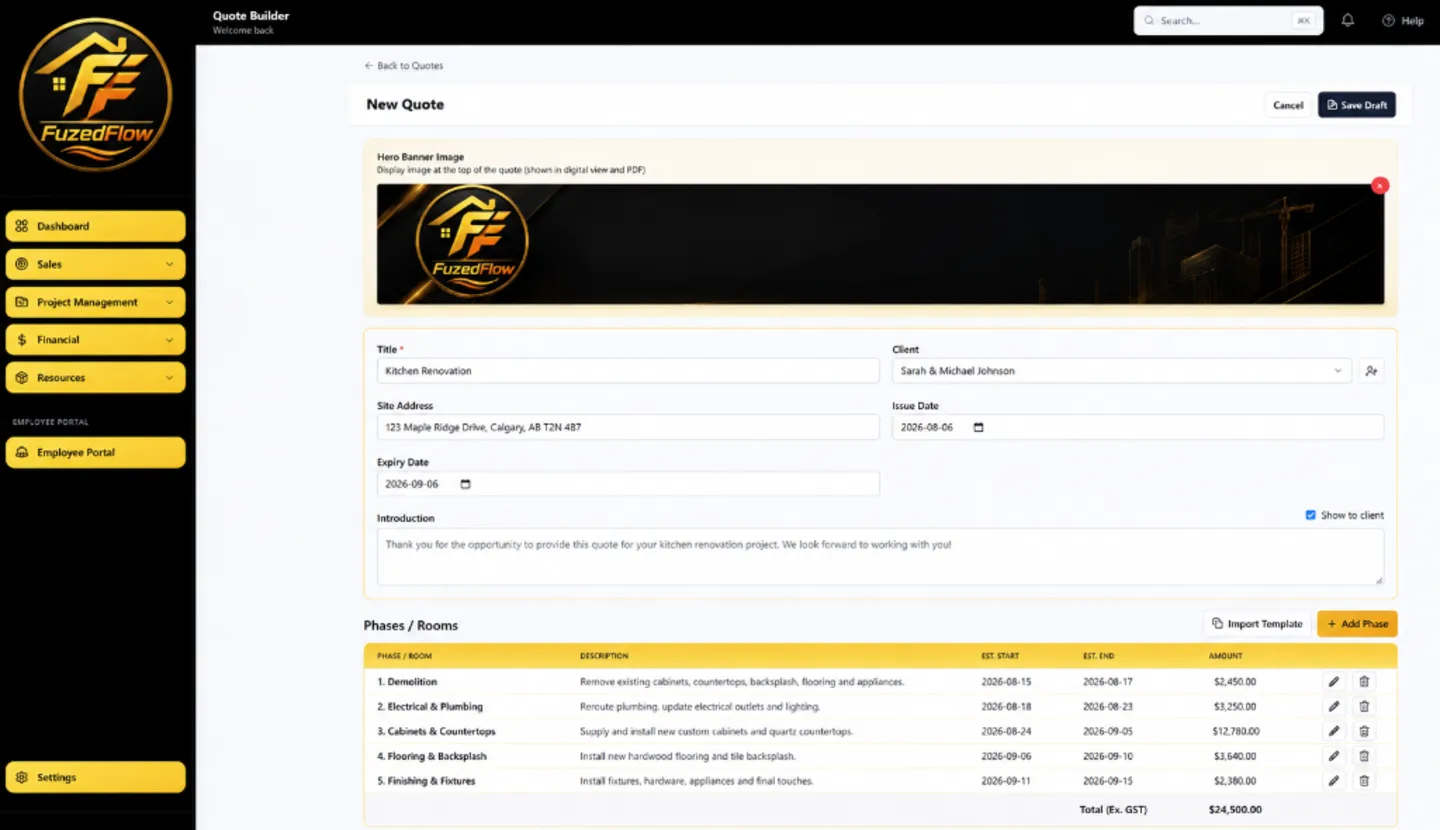
Build the scope in phases and add priced line items.
Review costs, gross margin, tax and optional upgrades.
Share the quote; the client chooses options and approves the scope.
Worked example
For a bathroom renovation, create phases for demolition, plumbing, electrical, waterproofing, tile and finishing. Keep the standard fixture allowance in the base scope and offer a $1,200 premium fixture package as an option. The client can review the difference, choose the upgrade and approve the resulting quote total online.
Illustrative workflow. Prices and scope are examples, not customer results.
A closer look
A contractor estimate needs to do more than produce a total. It should show what is included, where the work belongs and which assumptions the price depends on. Fuzed Flow organizes the quote into phases so the structure can follow the actual job sequence.
Inside each phase, add priced line items with scope descriptions, quantities, material and labour costs, client pricing and supporting photos. That gives the office a working cost record while the client receives a clearer explanation of the proposed work.
The builder compares total cost with client revenue and displays the estimated margin amount and percentage. You can also account for discounts, tax settings, a required deposit and a milestone payment schedule before sending the document.
These figures help with estimating decisions, but they are based on the information entered by your company. They are not a guarantee of job profitability and do not replace bookkeeping or accounting review.
Optional line items let a client compare an upgrade without mixing it into the base scope. For example, a standard fixture can remain in the main estimate while a premium fixture package is presented as an optional selection.
When the client reviews the shared quote, selected options update the approval total. The resulting choice stays connected to the quote activity instead of being buried in a separate email thread.
After approval, the quote remains connected to the client and downstream project or invoice workflow. Selected material items can also be carried into project material tracking when they are marked for that purpose.
Reusable quote, phase and pricebook records help with repeat work, but every new estimate should still be checked against the current site conditions, supplier pricing and subcontractor scope.
Build phased quotes with line items, material and labour costs, client prices, scope text and photos. Review the cost-to-revenue margin before sharing a branded PDF, then let the client choose optional items or phases before online approval. Professional and Business include AI Rewrite with Undo for supported quote line-item descriptions and internal notes.
All plans
Yes. The quote builder compares entered costs with client revenue and displays an estimated margin amount and percentage. The result depends on the accuracy of the costs, quantities and pricing entered by your company.
Yes. Optional items or phases can be presented in the shared quote. The client's selections change the approval total and remain connected to the quote record.
Use full quote templates, phase templates and reusable pricebook items to start familiar work faster. Review every copied scope, quantity and price before sending the new estimate.
No. Fuzed Flow helps prepare and approve contractor scope and pricing. It does not replace formal bookkeeping, payroll, tax filing or an accountant's review.
Choose a plan or request a walkthrough with the Fuzed Flow team.