Contractor workflows
What makes FuzedFlow different?
The useful difference is in the handoffs: from a clear quote to an informed client and a documented final walkthrough.

What makes FuzedFlow different?
FuzedFlow connects the records contractors use to win and finish work: phased quotes with client options, reviewed project updates, approval records and photo-based deficiency checklists. Its emphasis is the path from agreed scope to a clear handover, with plan-specific tools for the office and crew.
The difference: follow the whole job
A renovation produces more than tasks. It produces a scope, choices, photos, approvals, updates, invoices and a final list of items to finish. When those records live in separate spreadsheets, email threads and phones, the hard part is often working out which decision belongs to which version of the job.
FuzedFlow is built around that sequence. Start with a lead and quote, prepare the project, record what happens on site, share reviewed updates, and finish with a documented closeout. The point is to keep the job understandable as it moves between the office, the project manager, the crew and the client.
Many construction tools offer estimating, scheduling or invoicing. Our approach puts particular attention on the handoffs between them: what the homeowner approved, what changed, what the client needs to know next, and what still needs to be completed.
For a side-by-side look at everyday record keeping, see FuzedFlow versus spreadsheets.
Quotes that explain the work before the price
A single line that says “bathroom renovation” leaves a homeowner with questions. Does it include waterproofing? Which fixtures are allowed for? What happens if they choose a different tile?
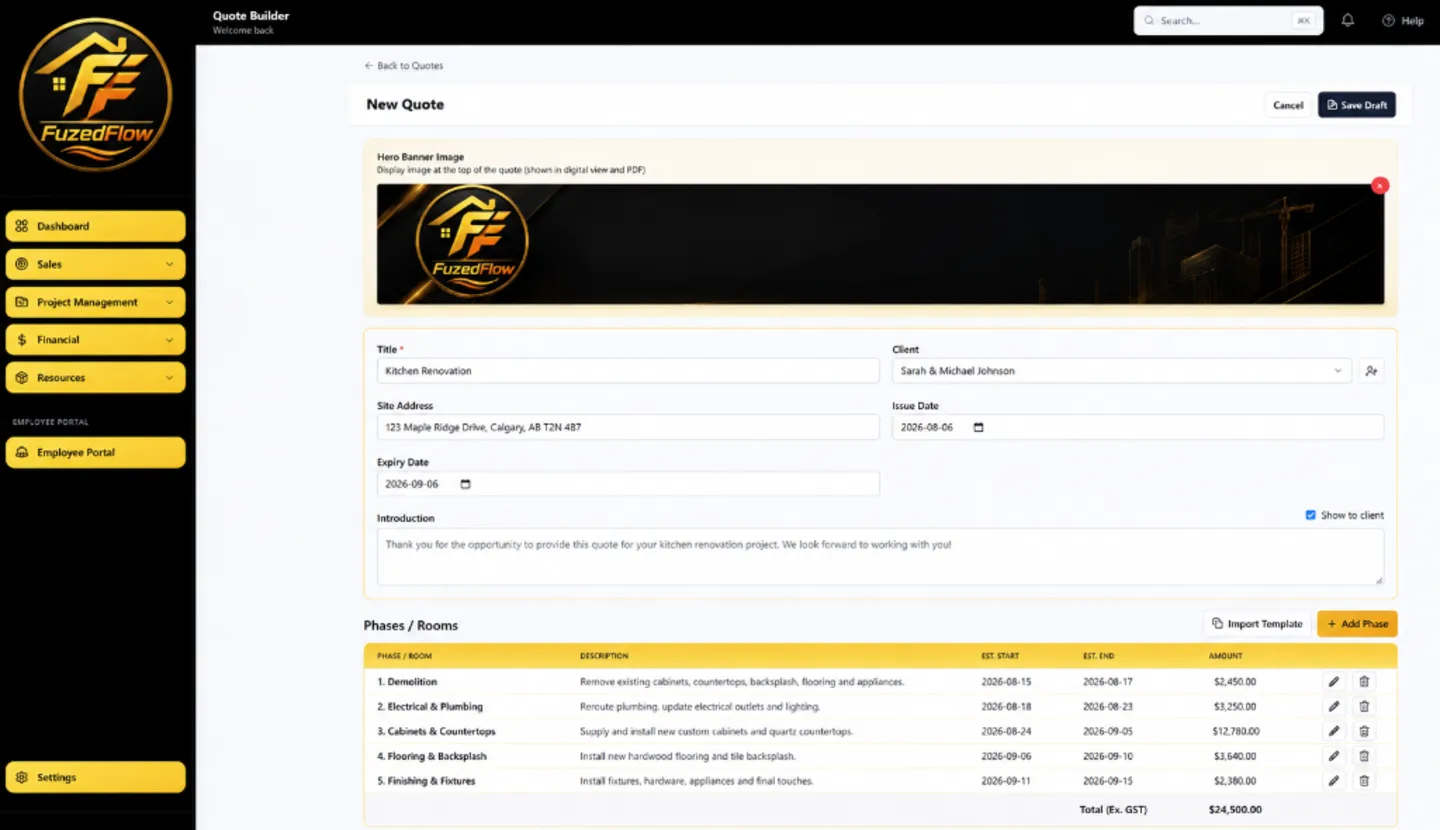
In FuzedFlow’s estimating and quoting workflow, you can organize the scope into phases, add priced line items and supporting photos, and present optional items or phases for the client to select. Material and labour costs remain useful to your team while the client reviews the proposed scope and price.
For example, separate demolition, rough-ins, waterproofing, tile and finishing. Keep the agreed base scope clear and offer a premium fixture package as an option. The client’s selected options update the approval total, so the choice belongs to the quote record.
Reusable templates and pricebook items give familiar work a starting point. You still review the quantities, current supplier prices, allowances and site conditions on each new job.
Client updates that answer “what happens next?”
A busy site can make visible progress while the homeowner still feels uninformed. A useful update explains what was completed, what is coming next, and whether the client needs to make a decision or provide access.
Client project updates give those details a consistent structure. Prepare a draft, review a branded PDF, publish the update to the Client Portal, then share it by email or text link. Your company controls which portal sections are shown.
An illustrative update
The rough site note
“Plumbing done. Waiting on electrical inspection. Drywall next. Need vanity choice.”
The version a homeowner can act on
“The plumbing rough-in is complete. We are waiting for the electrical inspection before drywall begins. Please confirm your vanity selection so we can check the dimensions before the next stage.”
On Professional and Business, AI Rewrite with Undo can help improve supported text fields. The contractor supplies the facts and reviews the result before saving or sending. It is useful for wording; it cannot confirm that an inspection passed or that a trade will arrive.
Internal daily logs serve a different purpose. They preserve site details such as completed work, blockers, crew and photos. A client update is the reviewed message you choose to share.
Changes and closeout deserve a clear record
A requested extra should not disappear into a text conversation. On Professional and Business, change orders let you describe the changed work, price it separately, share it for approval and convert agreed work into an invoice. That makes the extra easier to distinguish from the original quote.
The same attention to detail matters at the final walkthrough. “A few touch-ups” is hard to assign. A photo of the paint repair, a description, a responsible subcontractor and a status give everyone something concrete to work from.
Project closeouts and deficiency checklists support Quick Photo Capture or a Guided Walkthrough. Add trade categories, descriptions, subcontractors and optional due dates. Track items through Open, In Progress, Ready for Review and Complete. Share the reviewed client checklist and send each subcontractor a PDF package containing their assigned items.
This is a practical difference for renovation work: the workflow gives the last small items the same visibility as the work that won the job.
What that looks like on one bathroom renovation
The following is an illustrative workflow, not a customer case study or a claim about results.
- Agree on scope. Quote demolition, rough-ins, waterproofing, tile and finishing as separate phases. Offer the premium fixture package as an optional item.
- Prepare the job. Create the project plan and track selected quote materials marked for project material tracking. Share the relevant drawings and trade scope.
- Record the site work. Save rough-in photos and note the decision or inspection needed before closing the wall.
- Communicate the next stage. Publish a client update explaining completed work, upcoming work and the vanity selection still needed.
- Document an extra. If the homeowner adds an outlet, prepare a separate change order for approval on a plan that includes change orders.
- Finish the small items. Photograph a grout repair and a paint touch-up, assign them to the relevant trades and review completion.
The value is the continuity of the record: a decision has somewhere to live, an update has a purpose, and a deficiency has an owner. Follow the full worked renovation example for the connected steps through invoicing.
Who FuzedFlow fits—and what to check first
FuzedFlow is aimed at small and growing contractors who handle both customer-facing documents and on-site coordination. That includes renovation contractors, general contractors, home builders and trade businesses.
It is especially relevant when the same project moves between an owner who quotes, a project manager who coordinates trades, and a homeowner who needs clear updates. Start with the handoff that currently creates the most repeated questions or missing information.
Check the plan against the workflow
All plans include estimating, client updates, branded PDFs, the Client Portal and photo closeout tools. Professional and Business add change orders, employee and time-tracking tools, and AI Rewrite in supported fields. AI Rewrite has usage limits. Review current plans, user allowances and project limits before choosing.
Check the connections you rely on
FuzedFlow supports Stripe payments and selected CSV import and export workflows. Accounting connections and external calendar sync have their own availability status. If a specific connection is essential to your business, check the current integrations page and discuss the actual records you need to move before committing.
A better way to evaluate contractor software
Use the 14-day trial to follow one realistic job. A feature list is easier to judge when you can see how your own scope, decisions and client communication fit together.
- Build a phased quote with one optional upgrade. Is the included work easy to understand?
- Review entered costs and the estimated margin. Are the assumptions accurate?
- Open the client view. Can you clearly see the documents and actions you intended to share?
- Draft an update covering completed work, upcoming work and a client decision.
- Create a sample closeout item with a photo, an assigned trade and a completion status.
- Check the plan limits, team permissions and any essential integration.
Use the contractor estimate checklist and project closeout checklist as starting points. For this trial, sample contacts and fictional job details let you explore without involving a real homeowner.
Common questions
What is FuzedFlow?
FuzedFlow is construction management software for contractors and trade businesses. It brings lead records, estimating, project coordination, client documents, updates, invoices and closeout records into one workspace.
Are client updates and photo closeouts included on Starter?
Yes. Client updates, branded PDFs, portal sharing and photo deficiency checklists are included on all plans. Starter has its own user and active-project limits; compare the current plans for the details.
Does AI Rewrite send the message for me?
No. You choose AI Rewrite in a supported field, review the revised wording, and save or send through the normal workflow. Undo restores the previous text. AI Rewrite is included on Professional and Business, subject to usage limits.
What should I bring to a demo?
Bring an example of your quote structure, a typical client update and the way you currently track unfinished items. Remove private client details if they are not needed. The team can then walk through the parts that matter to your business.